FRI
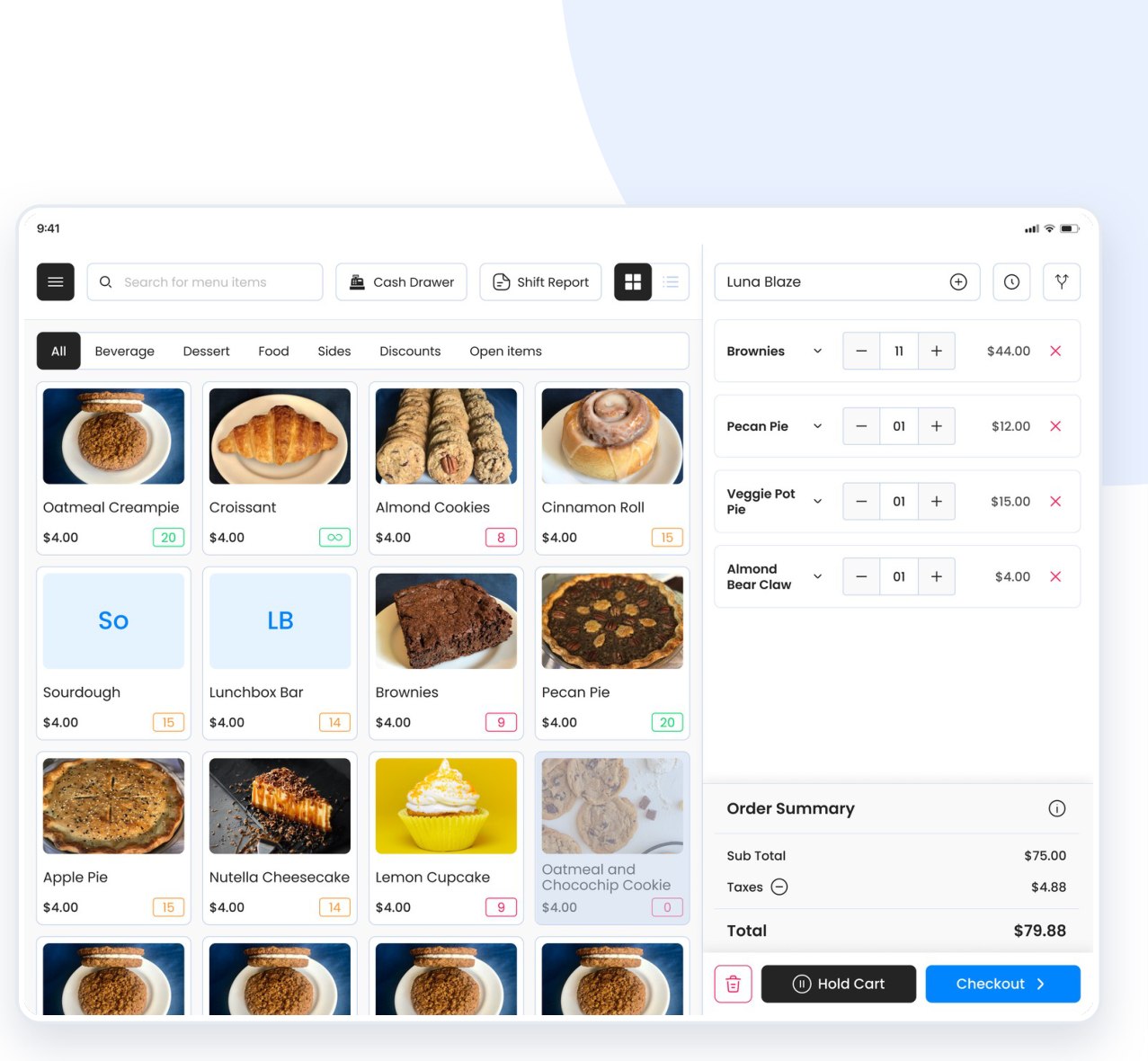
A complete restaurant operations platform — redesigned for speed and clarity.
POS · Kitchen Display · Orders · Sales · Labor · Customers · Menu — on iPad.
Project at a glance
FRI is an all-in-one operations platform for food businesses — taking orders, running the kitchen, processing payments, and giving owners the data to run the floor. We redesigned the whole experience and added new menu-setup capabilities.
UX / UI Design · interaction & visual design (with one other UX designer)
Cafés, restaurants, bakeries & stadiums
Figma · FigJam — iPad-first, role-based system
Live operators in Malaysia & Thailand
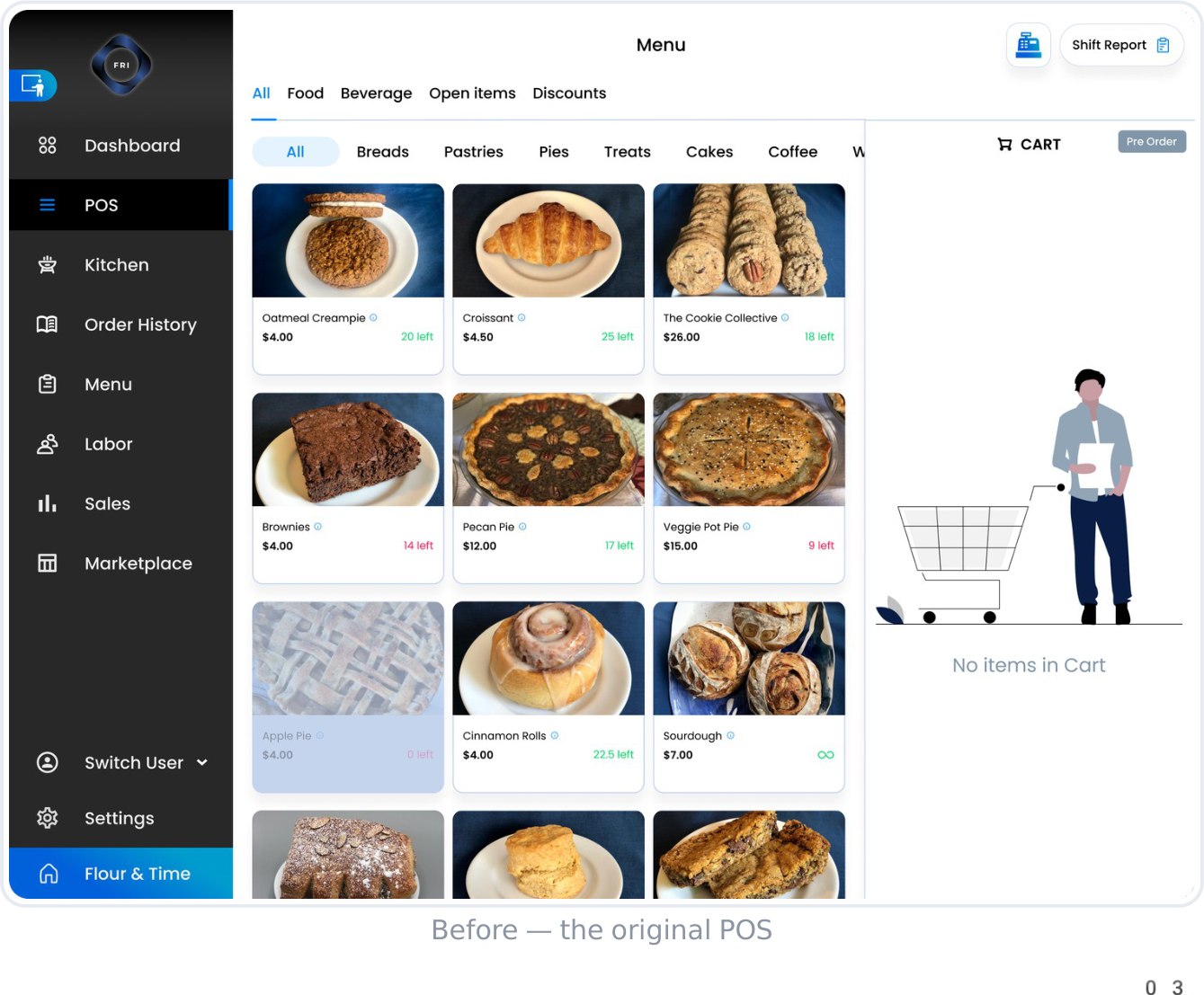
Powerful — but cluttered
- Navigation always docked A permanent sidebar ate a whole column of screen on every page.
- Dense, busy screens Too much shown at once — hard to scan during a rush.
- Too many clicks Everyday tasks took more steps than they needed to.
- High cognitive load Staff had to hunt for the action they wanted.
Reclaiming the canvas
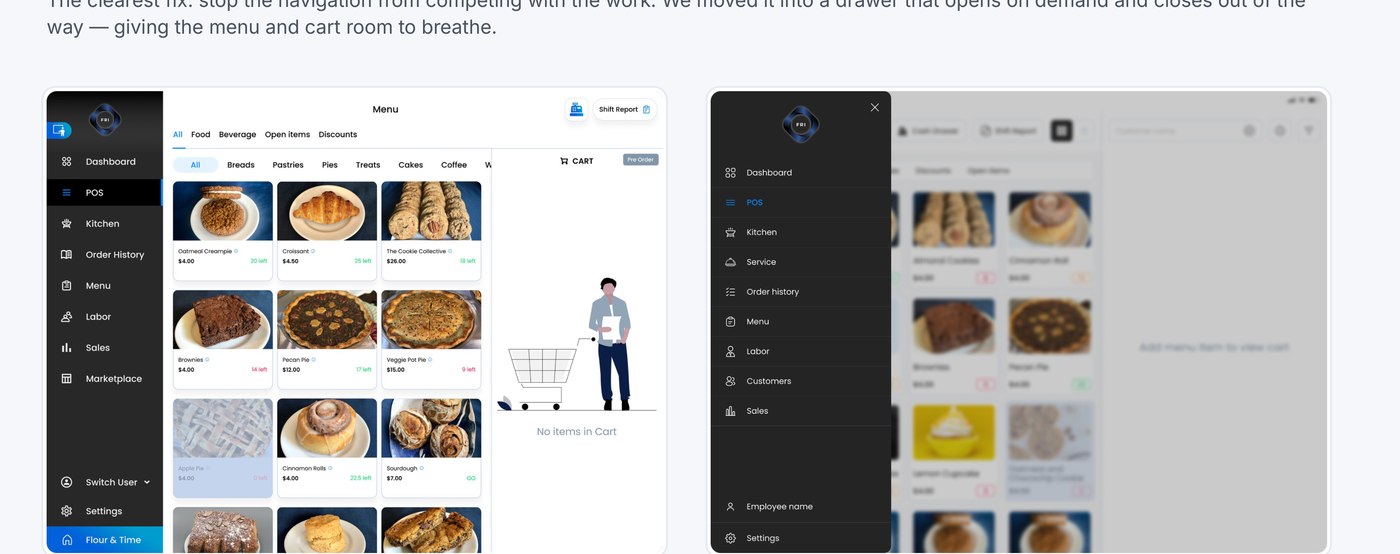
The clearest fix: stop the navigation from competing with the work. We moved it into a drawer that opens on demand and closes out of the way — giving the menu and cart room to breathe.
Two audiences, one system
Front-line staff
Servers, bartenders & kitchen need speed under pressure — take the order, fire it, get paid, with zero hunting.
Owners & managers
Need clarity from dense data — sales, labor and customers — to make fast calls about the floor.
Principles
- Hide chrome, reveal contentDefault to the work; surface controls on demand.
- Clarity under pressureScannable at a glance, even mid-rush.
- Dense data, not overwhelmingStructure and colour do the heavy lifting.
- One consistent systemShared patterns across every module.
Designed with real operators
This wasn’t designed in a vacuum. FRI runs in real venues in Malaysia and Thailand — we fed their day-to-day feedback straight back into the redesign.
Deployed live
Running in real cafés & restaurants abroad.
Gathered feedback
Watched real staff use it in service.
Redesigned to fit
Reworked flows around their requirements.
Shipped & repeated
Iterated continuously with operators.
One platform, three surfaces
Eleven screens, organised into three clear areas — so every role finds its tools fast.
Front-line in the heat of service
- POSTake & build orders
- Kitchen DisplayFire & track tickets
- Order HistoryPayments & refunds
Management clarity from the data
- Sales AnalyticsDaily & item-level
- Labor & TimeHours & overtime
- CustomersCRM & loyalty
Menu & Setup built in minutes
- AI MenuPhoto to items
- Global ModifiersReusable add-ons
- GratuityRule-based tips
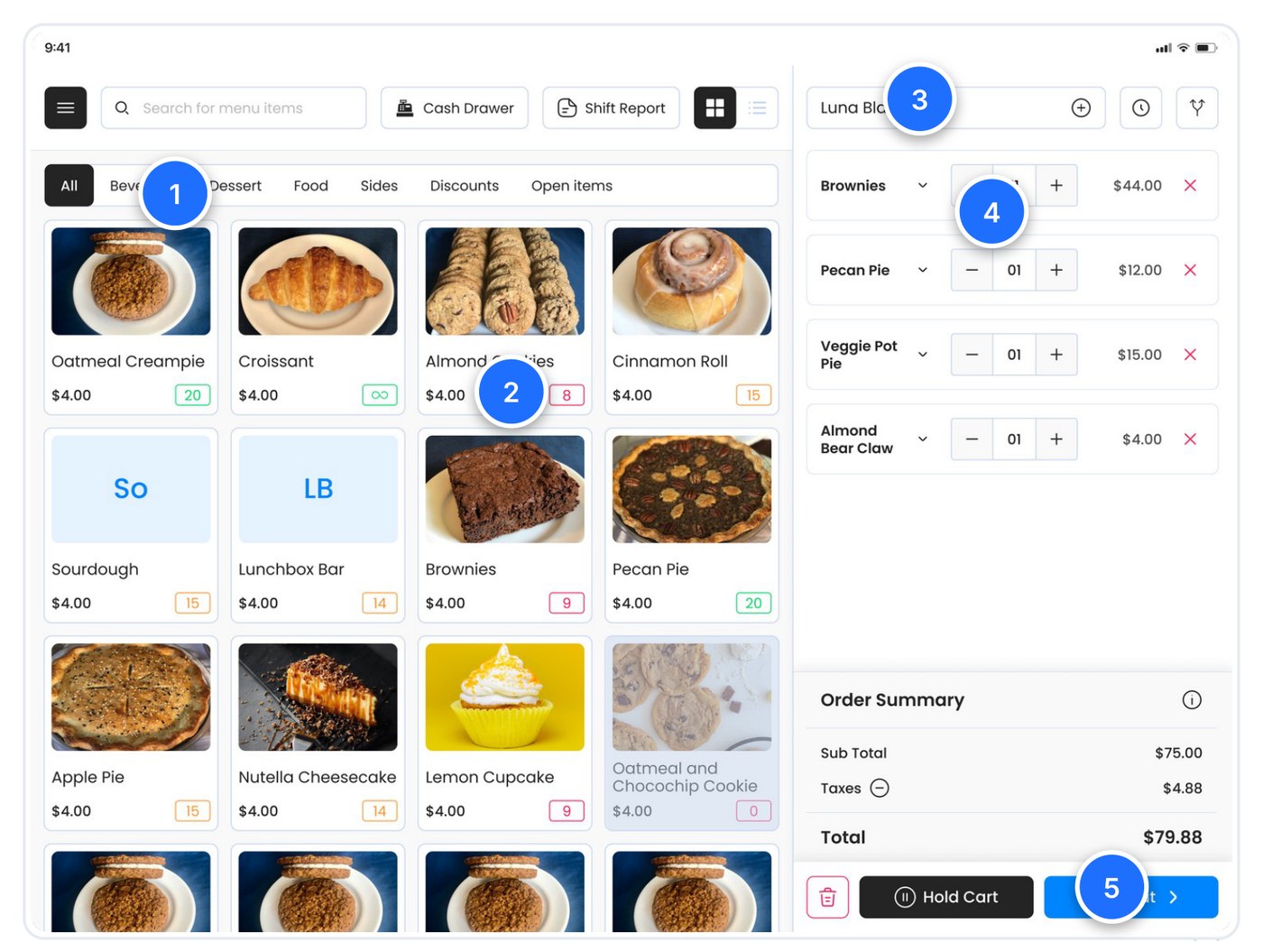
Taking an order, fast
- Category filtersJump to Food, Beverage, Sides in one tap.
- Live stock badgesPer-item counts, colour-coded — green to red.
- Assign a customerTie the order to a guest for history & tabs.
- Inline quantityAdjust amounts right in the cart.
- Hold or checkoutPark a cart, or move straight to payment.
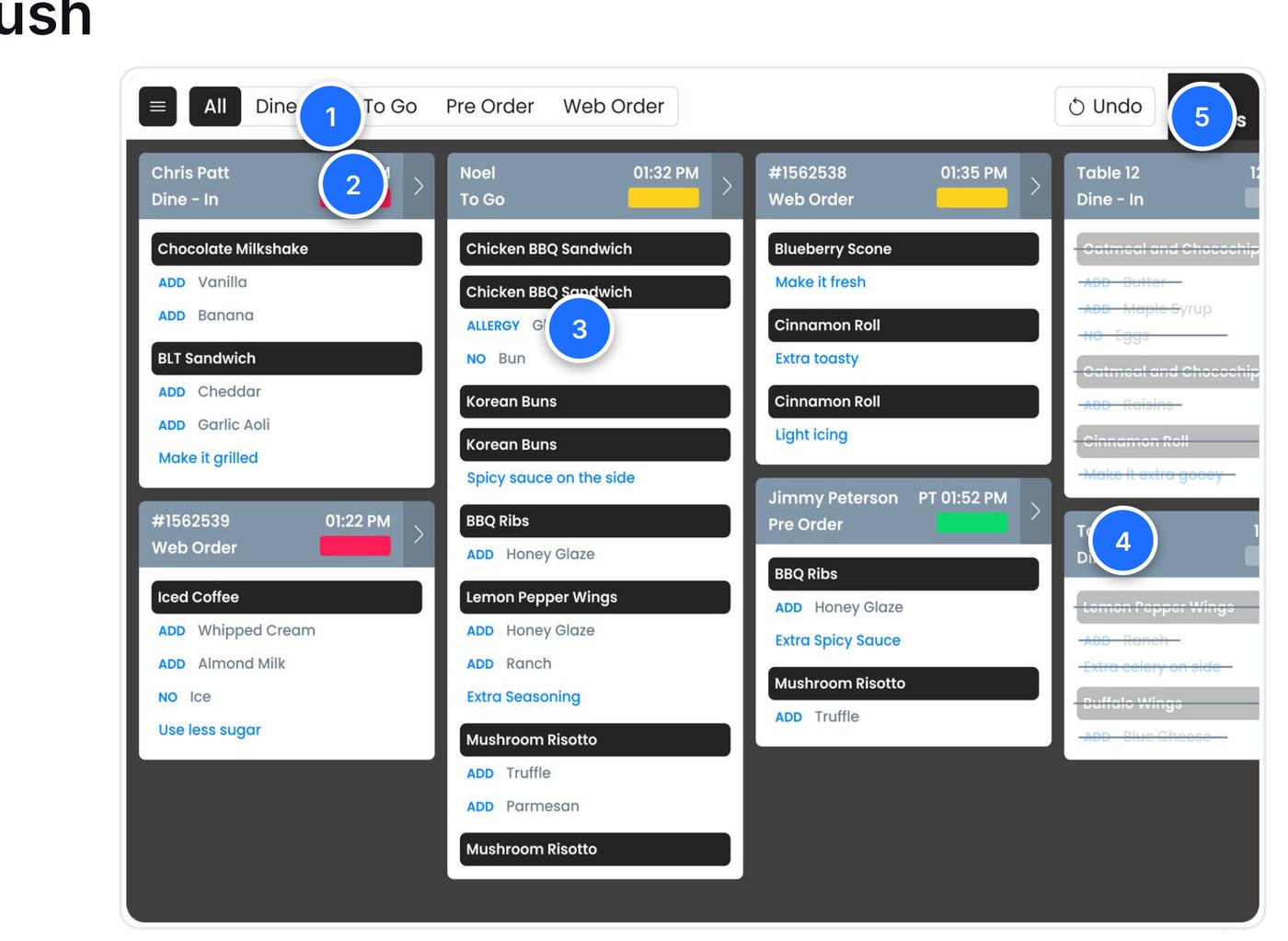
Built for the kitchen rush
- Order-type lanesDine-In, To Go, Pre & Web orders, filtered.
- Timing status barColour shows how long a ticket’s been waiting.
- Modifiers & allergiesADD / NO / ALLERGY surfaced clearly per item.
- Tap to completeFinished items strike through instantly.
- Undo + live countOne-tap undo and an always-visible order total.
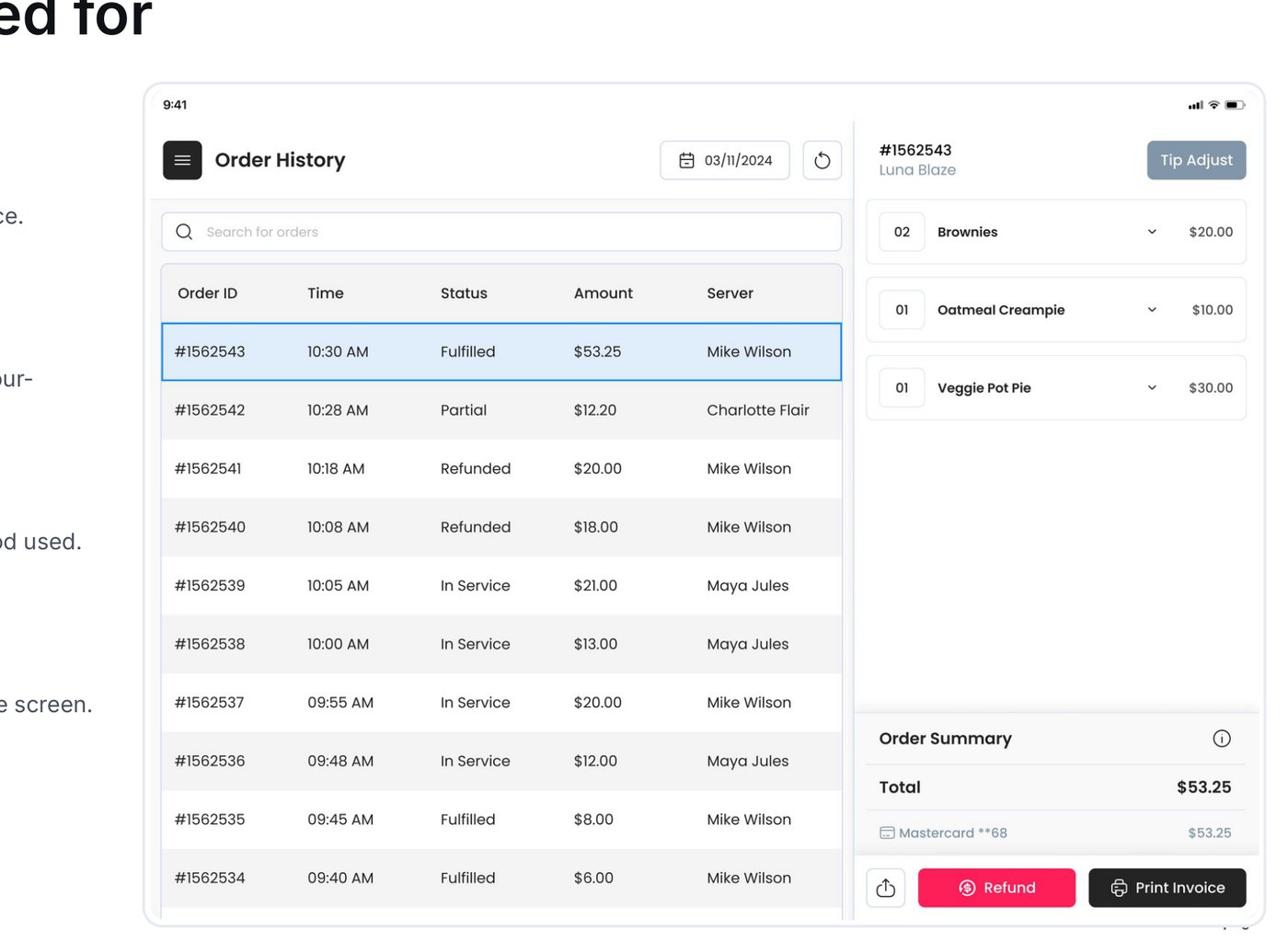
Every order, accounted for
- Searchable order logID, time, status, amount and server at a glance.
- Clear status systemFulfilled, Partial, Refunded, In Service — colour-coded.
- Detail & paymentItemised breakdown with the payment method used.
- Refund · tip-adjust · printPost-sale actions handled without leaving the screen.
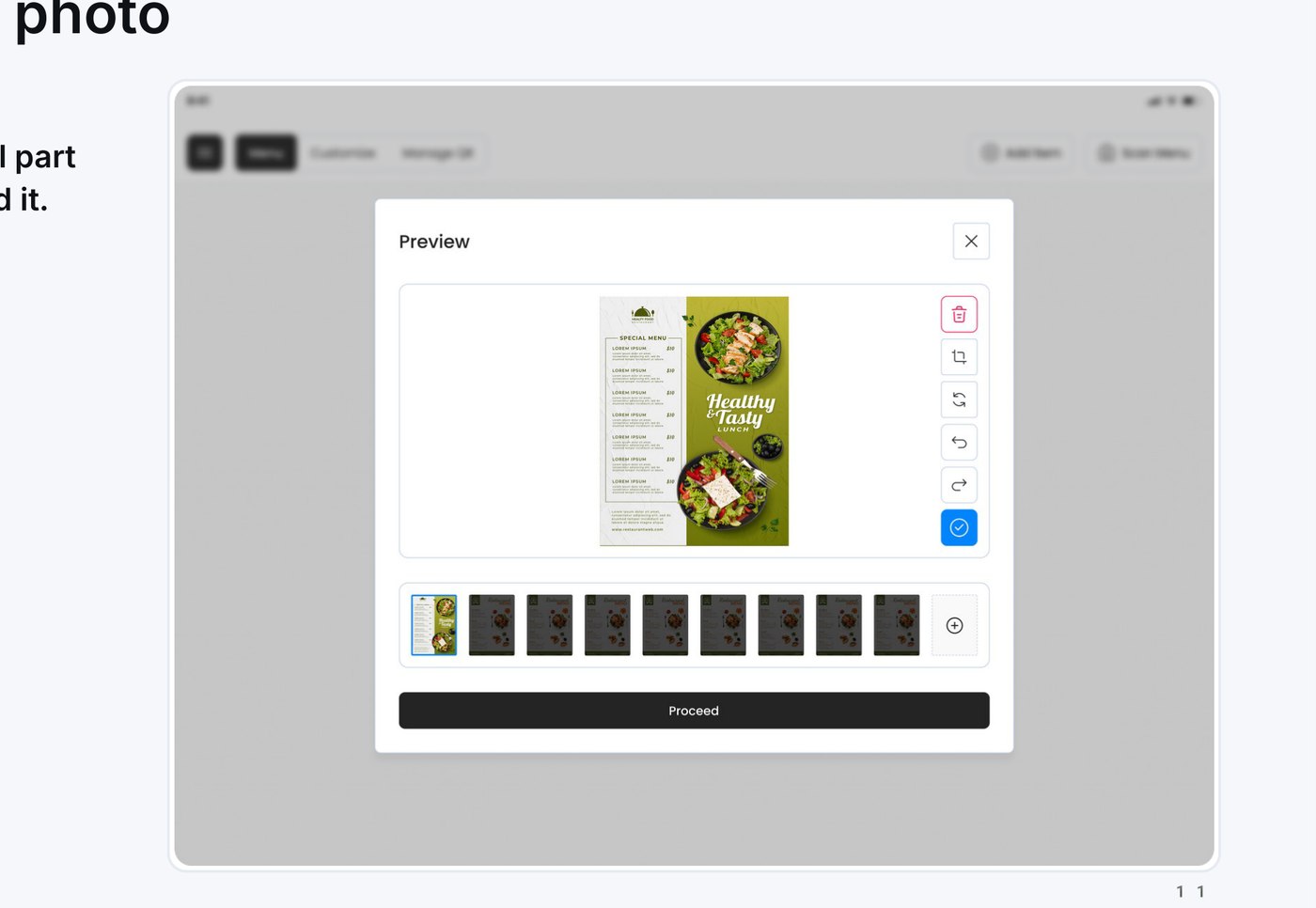
Set up a menu from a photo
Manual menu setup is the most painful part of onboarding a venue. So we removed it.
- Snap the paper menuPhotograph one or many menu pages.
- Crop & confirmQuick adjust, rotate, then Proceed.
- Items generated for youThe menu is built automatically — no typing.
Reusable modifiers & smart gratuity
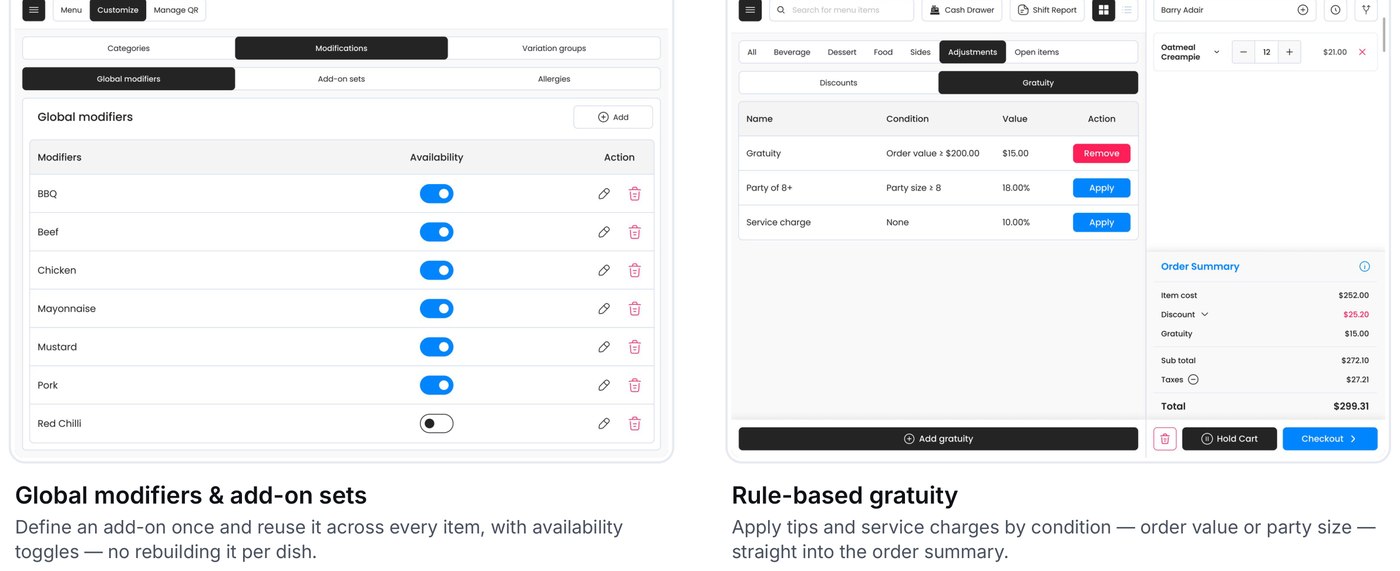
Global modifiers & add-on sets
Define an add-on once and reuse it across every item, with availability toggles — no rebuilding it per dish.
Rule-based gratuity
Apply tips and service charges by condition — order value or party size — straight into the order summary.
Sales, read at a glance
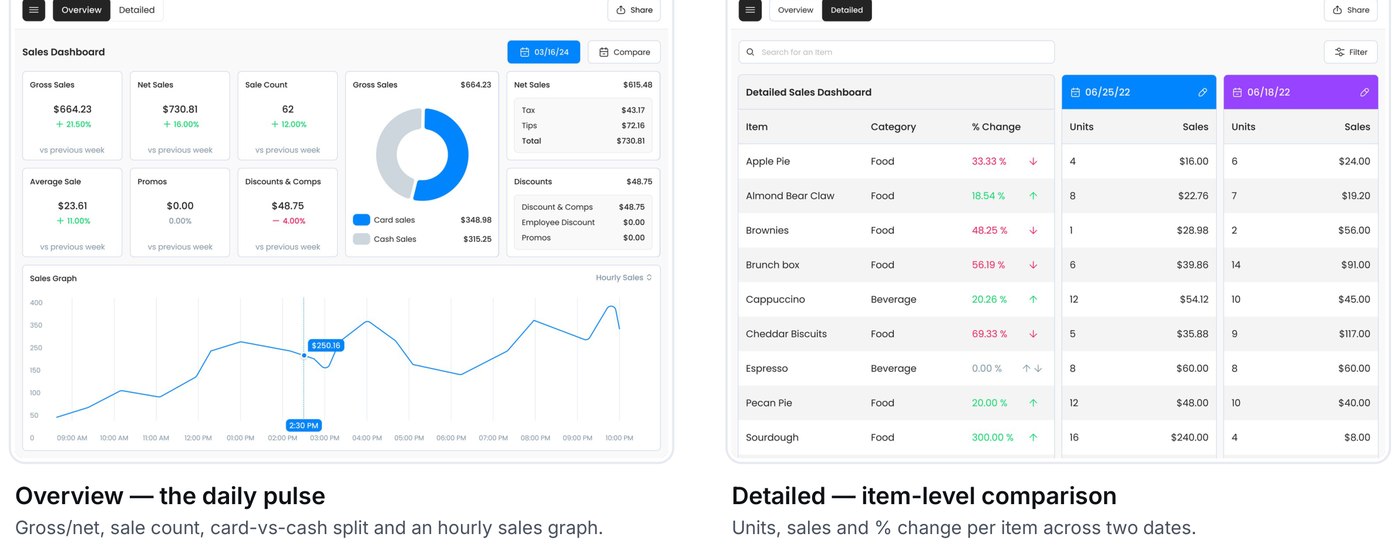
Overview — the daily pulse
Gross/net, sale count, card-vs-cash split and an hourly sales graph.
Detailed — item-level comparison
Units, sales and % change per item across two dates.
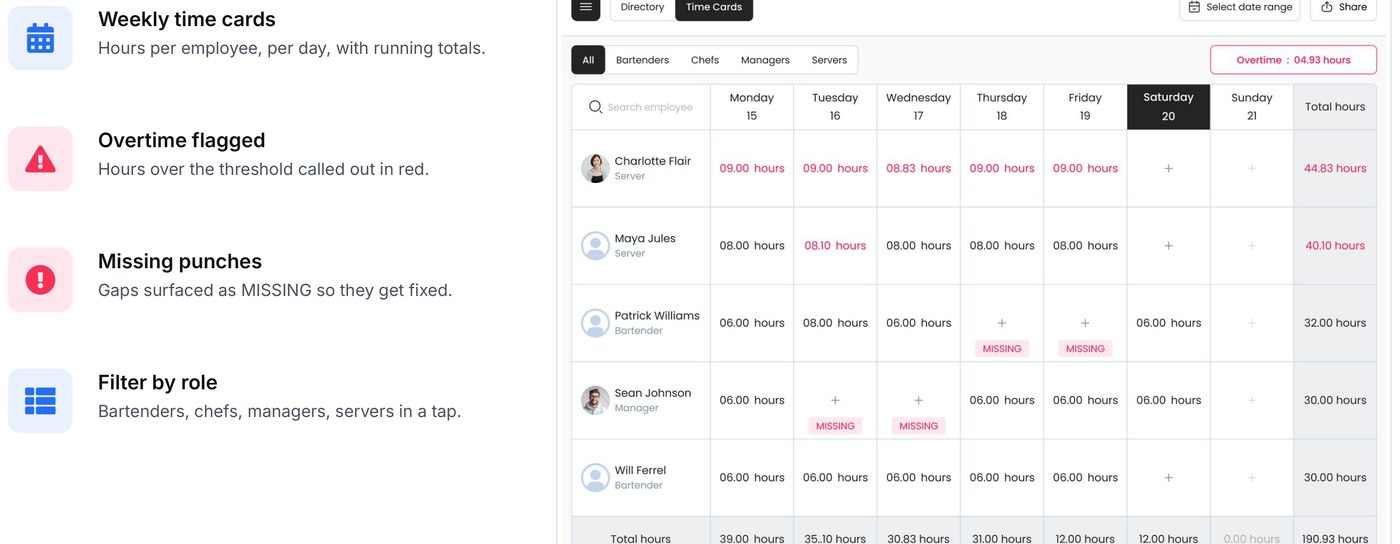
Staff hours, without the spreadsheet
- Weekly time cardsHours per employee, per day, with running totals.
- Overtime flaggedHours over the threshold called out in red.
- Missing punchesGaps surfaced as MISSING so they get fixed.
- Filter by roleBartenders, chefs, managers, servers in a tap.
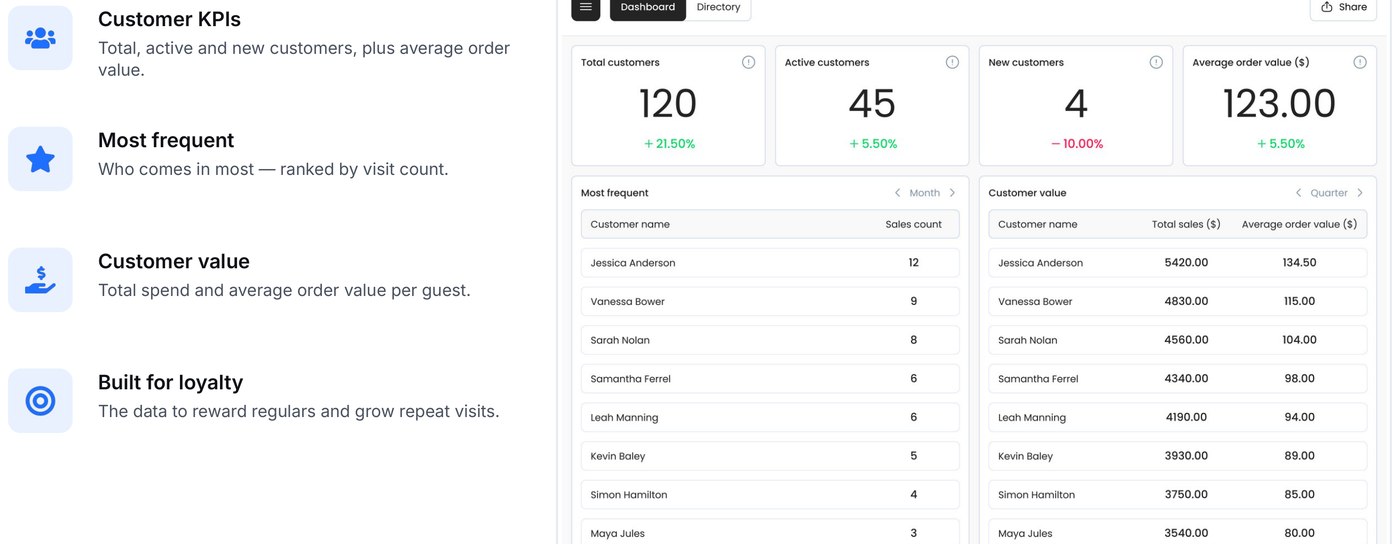
Knowing the regulars
- Customer KPIsTotal, active and new customers, plus average order value.
- Most frequentWho comes in most — ranked by visit count.
- Customer valueTotal spend and average order value per guest.
- Built for loyaltyThe data to reward regulars and grow repeat visits.
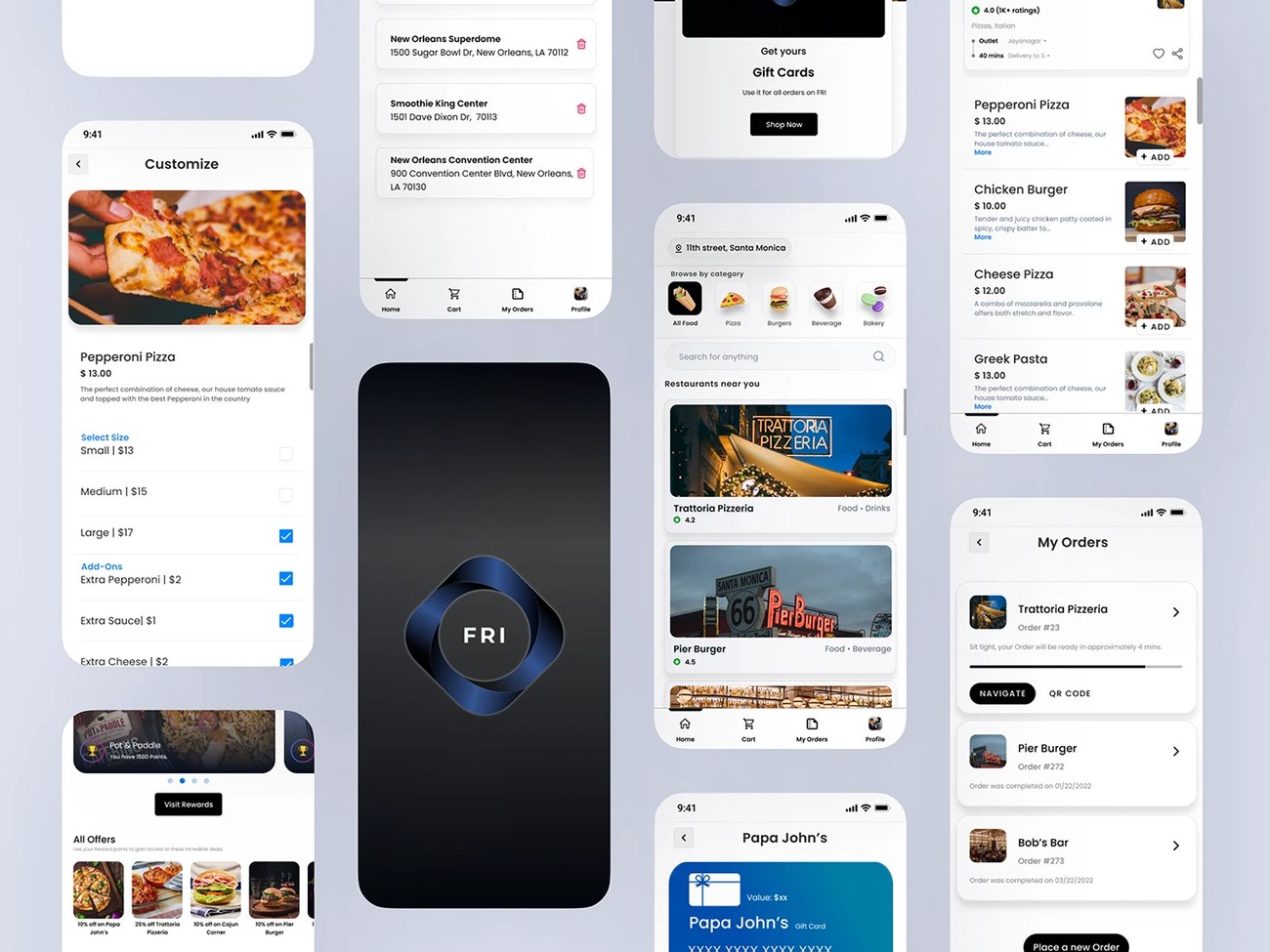
The Guest-Facing App
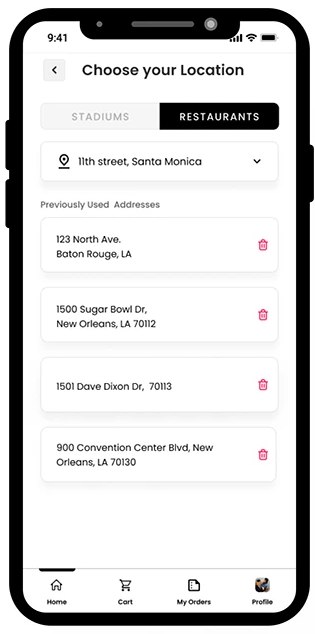
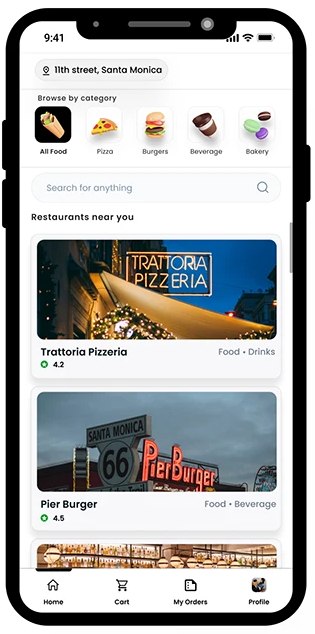
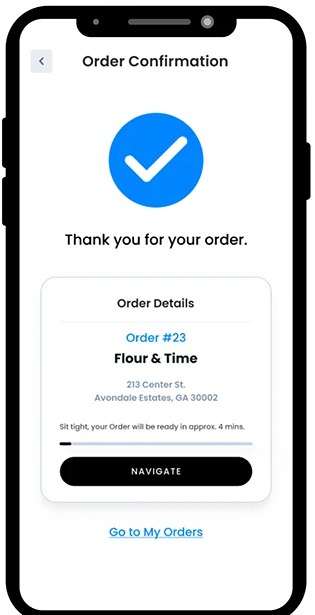
Alongside the operator side above, FRI also has a customer-facing ordering app — co-designed with Shivani Srivastava. It serves two quite different guest types, so the flows were built around both from the start.
Stadiums & large-capacity venues
Order & pay from your seat, notifications when the order’s ready, pre-ordering before the event, and individualised QR codes per seat.
Restaurants & small-capacity venues
A customised home screen, reward points for in-app savings, tableside QR ordering, and mobile payments for a faster checkout.
Guest ordering for first-time stadium users — no account required to place an order.
Switching between Restaurants and Stadiums stays within two taps from the location badge.
Gift cards, customisations and pre-orders, each behind a clearly distinguished call to action.
Faster floors, happier setup
Fewer clicks
Everyday tasks take fewer steps than before.
Time saved
Staff move through service noticeably faster.
New features land
AI menu, gratuity & global mods well-received.
(Reported qualitatively by operators — quantified metrics still being gathered.)
What I took away
Removing beats adding
Hiding the nav did more for usability than any new feature.
Real users change everything
Operator feedback reshaped flows we’d assumed were fine.
A system scales
Shared patterns kept 11 screens coherent across two designers.
Thank you.
A faster, calmer way to run a restaurant.